Discover MINISFORUM France: A Buying Guide to Mini PCs, NAS and Custom Builds
Compare MINISFORUM mini PCs, workstations, NAS systems, motherboards and accessories. Explore features, buying advice and ways to save on selected products.
- Author : Rucha
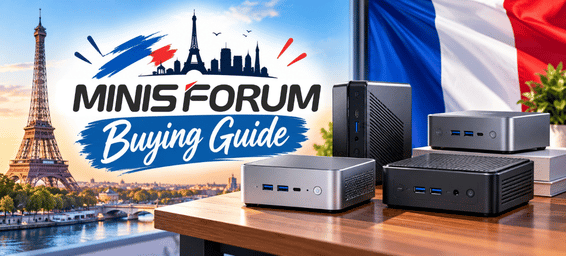
Finding the right computer is not always about choosing the most powerful model. Sometimes, a compact system that fits neatly on your desk is all you need. In other cases, you may want a workstation for demanding applications, a dedicated device for storing files, or individual components to build a customised setup.
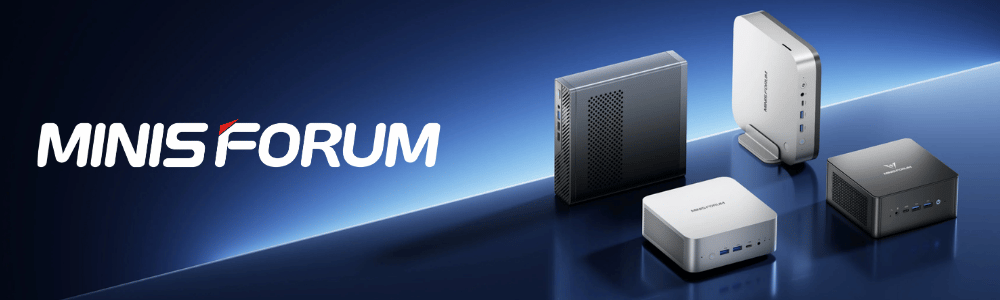
MINISFORUM caters to these different needs with a range that includes mini PCs, workstations, NAS systems, motherboards, and accessories. Each category serves a different purpose, so understanding the differences can make it easier to narrow down your options.
This guide explores the main MINISFORUM product ranges, the features worth considering before buying, and ways to make your budget go further. Whether you are upgrading a home office, building a compact gaming setup, or planning a home storage system, the aim is to help you find a product that makes sense for your needs.
Why Consider MINISFORUM for Your Next Computer?
A compact computer can be a practical alternative to a traditional desktop, particularly when desk space is limited. It can sit beside a monitor, fit into a small workspace, and handle everyday computing without requiring a large tower.
The advantage of choosing the right mini PC is that you can match the hardware to your workload. Everyday office tasks do not necessarily require the same processing power as video editing, software development, gaming, or AI-related projects. MINISFORUM also offers products beyond complete computers, giving buyers options for storage, custom builds, and system expansion.
Price is another consideration. Depending on the model and configuration, selected products may be available at reduced prices, and occasional promotions can make higher-specification systems more accessible. The key is to compare the features you need with the total cost, rather than letting a headline offer determine your decision.
Find the Right MINISFORUM Product for Your Needs
Choosing a computer becomes easier when you know what you want it to do. You might need a compact PC for everyday work, a powerful workstation for demanding applications, a reliable way to manage files at home, or accessories to upgrade your existing setup. MINISFORUM offers options across all these needs, but the right choice comes down to the features you will actually use and the budget you want to stay within. Let’s explore each product range to help you compare your options and decide where your money will be best spent.
1. Mini Workstation Series – For Professional and Performance-Heavy Tasks
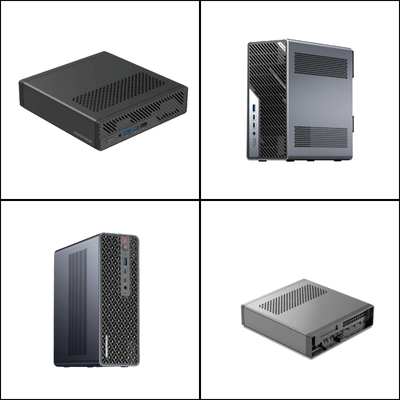
If your work involves development tools, demanding applications, virtual machines, technical projects, or intensive multitasking, a mini workstation may be worth considering. These systems are designed for users who need more capability than a basic everyday computer can provide, without necessarily wanting a full-sized desktop.
The MS-01 Work Station is an option for users who value processing performance and a broad range of connectivity options. It may suit technical workspaces, development environments, and multitasking setups where connecting several devices is part of the routine.
The MS-A2 Work Station, featuring an AMD Ryzen 9 9955HX processor in its listed configuration, is another option for users who need strong CPU performance. For more demanding professional workloads, the MS-02 Ultra offers an Intel Core Ultra 9 285HX processor and four DDR5 SO-DIMM slots.
At the higher-performance end, the MS-S1 MAX combines AMD Ryzen AI Max+ 395 processing with Radeon 8060S graphics. It may appeal to professionals exploring demanding creative applications, advanced computing, or AI-related workloads. The right choice will depend on the software you use and whether your work benefits more from CPU performance, graphics capability, memory capacity, or connectivity.
Before choosing a workstation, consider how long your applications run, how much memory you require, and whether you need room for additional storage. Cooling and fan noise are also worth thinking about if the system will be running demanding tasks for extended periods.
Workstation Deals: Where the Value Can Add Up
Workstations can represent a substantial investment, which makes comparing configurations particularly worthwhile. Selected models show price reductions of around 20%, although the exact saving varies by product and configuration.
For example, the MS-01 has been listed at approximately €479 against a reference price of €599. The example illustrates how comparing the current price with the reference price can help you assess the value of a particular configuration.
Higher-priced models may offer a larger saving in euros, but that does not automatically make them the better purchase. If your everyday work does not require advanced processing or graphics, a less expensive workstation could be the more sensible option.
Keep an eye out for additional promotional offers on selected systems, too, and check the terms before relying on an extra saving.
You may be able to save more by applying an eligible MINISFORUM coupon code to your purchase. Check whether the code applies to your preferred workstation and whether it can be used alongside the existing offer.
2. Mini PCs – Compact Computing for Home, Office and Gaming
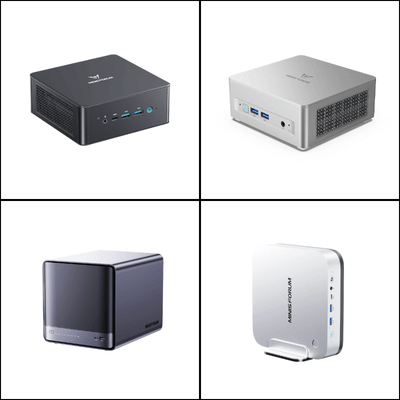
Mini PCs are among the most versatile options in the MINISFORUM range. They can support everyday office work, browsing, online meetings, streaming, study, and multitasking. Depending on the hardware, some models can also handle more demanding creative applications or gaming.
The UM760 Slim and UM870 Slim are worth comparing if you want a compact computer for everyday productivity. They may suit a home office, a shared family workspace, or a desk where keeping equipment out of the way is a priority.
For users who regularly run several applications at once, the UM890 Pro features an AMD Ryzen 9 8945HS processor and Radeon 780M integrated graphics. It offers a different performance profile from an entry-level mini PC and is worth considering if your workload includes heavier multitasking or compatible creative software.
The AI X1 and AI X1 Pro ranges are options for buyers interested in newer AI-focused processing alongside regular desktop tasks. If you plan to use AI-enabled applications, compare the processor, memory, and software requirements rather than relying on the AI label alone.
For gaming or graphics-intensive work, the AtomMan G1 Pro is a more performance-focused option, with an AMD Ryzen 9 8945HX processor and NVIDIA GeForce RTX 5060 graphics in its listed configuration. A dedicated graphics card can be useful for compatible games and applications, though performance will still depend on resolution, settings, and the software being used.
When comparing mini PCs, check whether RAM and storage are included or whether you are looking at a barebone configuration. The number of display outputs, available USB ports, network connections, and potential for future upgrades can also make a noticeable difference to everyday convenience.
Mini PC Pricing: Getting the Performance You Need for Less
Mini PC prices vary according to processor, graphics, memory, and storage. Selected models have around 15–25% discount, although individual offers may differ.
The UM760/UM870 Slim range had been listed with a price difference of around €170, while the UM890 Pro appeared with a reduction of approximately €120. Selected AI X1 configurations have also shown meaningful markdowns. These examples are useful starting points when comparing options, but it is important to check the specific configuration you intend to buy.
Some promotions may also provide an extra saving on qualifying mini PC purchases. If you are comparing several models, calculate the final price after any eligible coupon code rather than looking only at the advertised reduction. Applying an eligible code at checkout could make a sale-priced configuration even more affordable. A well-matched mid-range model can be better value than a more expensive system whose additional performance you rarely use.
3. NAS Series – A Practical Approach to Home Storage and Backups
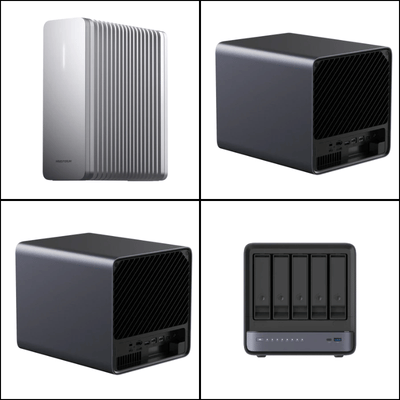
If your photos, videos, documents, and project files are spread across several computers and external drives, a network-attached storage system can help bring everything together. A NAS gives you a central storage location that can be accessed by compatible devices on your network.
MINISFORUM's NAS range includes the N5 Pro Desktop NAS, N5 Air AI NAS, N5 MAX AI NAS, and S5 AI NAS. These products differ in processing capability, storage support, and intended workloads, so the best fit depends on the size of your files and how you plan to use the system.
The N5 Pro is worth exploring if you need a capable storage platform with substantial expansion potential. Its listed configuration includes an AMD Ryzen AI 9 HX PRO 370 processor and support for high storage capacity. The N5 Air AI NAS, with an AMD Ryzen 7 255 processor and Radeon 780M graphics in its listed configuration, is another option to compare.
A NAS may be useful for a household that wants to organise a growing photo library, a creator managing large project files, or a technical user building a home server environment. More advanced systems may suit users who need additional storage capacity or plan to run more demanding workloads, but those extra capabilities are not essential for everyone.
Before buying, consider how much storage you need now and how quickly that amount might grow. Check drive compatibility, networking, expansion options, and software support. If you are storing important files, remember that a NAS alone is not a complete backup strategy; a separate copy of essential data is still important.
NAS Offers: Making Storage Upgrades More Affordable
NAS systems can vary considerably in price, particularly when you compare different storage capacities and processing specifications. Selected models offer approximately 18–20% discount.
Additional promotional offers may sometimes apply to particular NAS models. These can include a percentage reduction alongside an extra coupon, depending on the campaign and eligible product. Check the offer conditions and the final price before deciding.
It is also worth factoring in the cost of drives if they are not included in your chosen configuration. A NAS with a lower initial price may not be the least expensive option once you have added the storage capacity you actually need. Compare the complete setup rather than the device price alone.
Before purchasing, look for an eligible MINISFORUM coupon code that may provide additional savings on your chosen NAS model. Some promotions are limited to specific products, so check the conditions and confirm whether the code can be applied to an already discounted price.
4. Motherboard Series – For Custom Builds and Hardware Enthusiasts
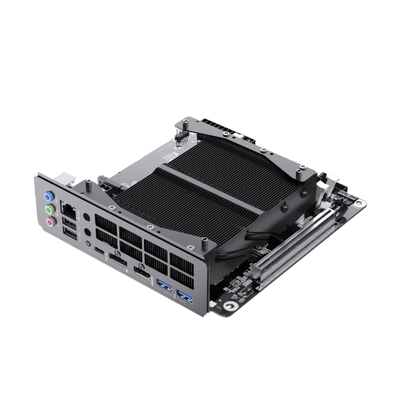
A motherboard can be a better fit than a complete mini PC if you enjoy building your own system and want more control over the final setup. It lets you plan around your preferred case, cooling arrangement, storage, and other compatible components.
MINISFORUM's motherboard range includes the BD775i SE and BD895i SE. These boards are intended for users who want a compact build with integrated processing hardware rather than selecting every core computing component separately.
The listed BD895i SE configuration includes an AMD Ryzen 9 8945HX processor, dual-channel DDR5 memory support up to 96GB, two M.2 NVMe SSD slots, and a PCIe 5.0 x16 expansion slot. Check the specifications of the individual model carefully before comparing it with another board, as features and compatibility can differ.
A compact motherboard build may appeal to PC enthusiasts, developers, or users who want a customised system for general computing and selected performance-focused tasks. However, it is important to check the dimensions of the case, power requirements, cooling, memory compatibility, and available expansion space before ordering.
If you are starting from scratch, remember to calculate the cost of the full build. A motherboard's advertised price does not include every component required to create a working computer, so compare the total with a ready-to-use mini PC.
Custom-Build Costs: Is a Discounted Motherboard Worth It?
Selected motherboard show reductions in the region of 18–20%. For example, the BD775i SE/BD895i SE listing had appeared at approximately €309 against a reference price of €379.
Whether that represents good value depends on the components you already own. If you have compatible memory, storage, and other parts, a discounted motherboard may help you create a customised system for less. If you need to purchase everything separately, however, the final cost may be closer to that of a complete mini PC.
You can also check whether a MINISFORUM coupon code is eligible for the motherboard you want to purchase. If an applicable code is available, applying it at checkout may reduce the cost further. Be sure to review any product exclusions and coupon conditions before relying on the extra saving.
Before making a decision, list the components required for your build and compare their combined price with a prebuilt alternative. This gives you a more realistic picture of the savings and helps avoid unexpected costs later.
5. Accessories – Improve Connectivity and Get More from Your Setup
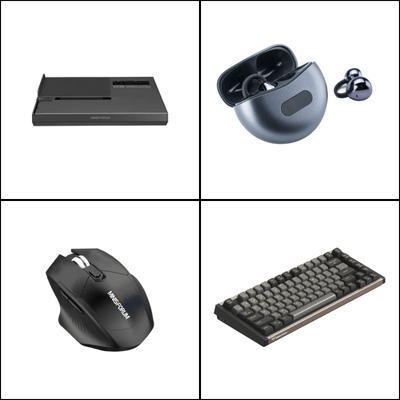
Replacing a computer is not always necessary when something about your setup needs improving. Sometimes, a suitable accessory can add a missing connection, make storage more convenient, or expand what a compatible system can do.
MINISFORUM offers accessories such as the DEG1 eGPU Dock, DEG2 OCuLink eGPU Dock, ESP4B PCIe expansion card, M.2 NVMe enclosures, USB4 cables, and selected peripherals.
The DEG1 and DEG2 eGPU docks may interest users who want to explore external graphics with a compatible computer. Before purchasing a dock, verify that your system supports the required interface and that the dock works with the graphics card and power supply you plan to use.
The ESP4B PCIe expansion card may be useful for compatible systems that need additional storage connectivity. An M.2 NVMe enclosure can turn a compatible SSD into portable external storage, while a suitable USB4 cable can support high-speed data transfer and other functions on devices that support the relevant features.
The right accessory depends on the limitation you want to solve. If you simply need extra storage, an enclosure may be more practical than a larger expansion setup. If you are considering an eGPU dock, confirm compatibility first so that you do not spend money on hardware your computer cannot use.
Accessory Savings: Upgrade Without Replacing Your System
Selected accessories have shown price reductions of around 15–25%, although the actual saving depends on the item.
A compatible accessory can be a relatively small purchase, but the savings can still add up when upgrading several parts of your setup. Look out for a MINISFORUM coupon code that covers accessories such as expansion cards, eGPU docks, or storage enclosures, and put the savings towards getting the most out of your existing system.
If an accessory solves a specific problem with your existing computer, it may be a cost-effective upgrade compared with replacing the entire system. The best purchase is one that adds practical value to the equipment you already own.
How to Save More on MINISFORUM Products
Getting better value often starts with taking a little time to compare the available configurations. Think about the tasks you need the system to handle, then narrow your choices to products that meet those requirements. Once you have a shortlist, it becomes easier to judge whether a promotion offers a meaningful saving.
- Keep an eye on seasonal shopping events. MINISFORUM has run promotional campaigns such as spring sales, Black Friday offers, Halloween sales, and many others. These events can be useful times to compare prices across mini PCs, workstations, NAS systems, motherboards, and accessories. However, not every product will receive the same reduction, and an event price is only worthwhile if the model fits your needs.
- Check whether an extra coupon applies. Depending on the campaign, selected offers may include an additional €10 saving or a €25 reduction on an eligible mini PC purchase with a minimum spend of €200. Some specific workstation or NAS promotions may combine a percentage discount with an additional €10 off. These offers can have restrictions, so confirm the eligible products, minimum spend, and any conditions before relying on the extra saving.
- Compare the final price, not just the headline offer. A barebone mini PC may require separate purchases of RAM and storage. A custom motherboard build may need a case, power supply, and cooling components, while a NAS may require additional drives. Adding these costs can change which option offers the best overall value.
- Choose specifications that match your workload. A mid-range mini PC may be enough for everyday office work, browsing, and video calls. More demanding applications may justify a higher-performance processor or dedicated graphics. Similarly, a NAS should offer the capacity and expansion options you need without making you pay for features you will not use.
- Review the promotion terms before checkout. Check the expiry date, eligible models, minimum purchase requirements, and whether a coupon can be combined with an existing sale price. Promotions can change, and an offer that applies to one configuration may not apply to another.
A little comparison can make a meaningful difference. Rather than choosing a product solely because it has a large markdown, focus on the system that meets your requirements and then use any eligible promotion to improve its value.
Check Today's Live MINISFORUM Deals
Which MINISFORUM Product Range Should You Choose?
If you are unsure where to begin, think about the main purpose of your purchase.
- For demanding professional workloads: Explore the Mini Workstation Series for higher-performance processing, technical applications, and specialised connectivity.
- For home, office, and gaming: Compare the Mini PCs based on processor, graphics, memory, storage, and display support.
- For centralised storage: Look at the NAS Series if you want to organise files, manage a media library, or build a home storage system.
- For a customised computer: Consider the Motherboard Series if you are comfortable checking component compatibility and assembling your own setup.
- For upgrading existing equipment: Explore Accessories if you need more connectivity, external storage, or a compatible graphics expansion option.
Your ideal choice does not have to be the most expensive one in the range. A model that comfortably handles your everyday workload and offers the connections you need may provide better long-term value than a higher-specification system you rarely use to its full potential.
Final Thoughts: Find a MINISFORUM Setup That Fits Your Needs
MINISFORUM offers several ways to approach compact computing. Mini PCs provide options for everyday productivity and performance-focused tasks, while the Mini Workstation Series is aimed at more demanding workloads. The NAS Series helps users build centralised storage, the Motherboard Series supports customised builds, and the Accessories range offers ways to expand compatible systems.
Before making your choice, compare the features that matter most, check the full cost of the setup, and consider whether any current promotion makes your preferred configuration more affordable. Seasonal campaigns and eligible coupons can be useful, but the best value still comes from buying a product that suits your needs.
With a clear idea of how you plan to use your computer, you can narrow down the options and choose a MINISFORUM product that fits your workspace, workload, and budget.